Workspace Discovery API Documentation
Discovery
The Discovery API helps you determine the service URLs that are available for the client, as well as the customer metadata that is necessary for the client operation.
Open API spec is available via your customer URL https://{CUSTOMER_DOMAIN}/citrixapi/swagger/index.html?urls.primaryName=discovery.
Notes:
- Replace ‘{CUSTOMER_DOMAIN}’ with either your
cloud.comdomain or configured custom domain.- An application ID is required to make API requests to the Workspace API. In order to obtain one you have to create an OAuth client.
- Requests must contain either the
Citrix-ApplicationIdheader, or theApplicationIdquery parameter with the value set to the above mentioned application ID. The Open API spec guides you on which is required for what endpoints.- It may take up to 5 minutes after creating an OAuth client before the application ID is accepted by the API.
- Does not require an authorization token.
- Response may contain one or many service entries in the service list.
- A service represents a grouped set of APIs with operations that relate to a similar domain.
- A service entry can contain one or many API endpoints with an optional capability list.
- The client can reference endpoints by “id” and services by “service” (name) as they are constant.
Store
The Open API spec is available via your customer URL https://{CUSTOMER_DOMAIN}/citrixapi/swagger/index.html?urls.primaryName=store.
Notes:
- Replace ‘{CUSTOMER_DOMAIN}’ with either your
cloud.comdomain or configured custom domain.- An application ID is required to make API requests to the Workspace API. In order to obtain one you have to create an OAuth client.
- Requests must contain either the
Citrix-ApplicationIdheader, or theApplicationIdquery parameter with the value set to the above mentioned application ID. The Open API spec guides you on which is required for what endpoints.
Authentication
The Authentication API contains endpoints that are protected by OAuth. You need to provide an Authorization header containing the OAuth Access token, e.g. "Authorization" = "Bearer <token>". If a valid Authorization header isn’t provided, the request fails with a 400 Bad Request response, with the reason stated as invalid_grant.
For example:
{
    "error": "invalid_grant",
    "error_description": "Access token is invalid."
}
<!--NeedCopy-->
To obtain an Access Token, follow the Authentication walkthrough.
Client Name and Device ID
Some API endpoints take parameters clientName and/or deviceId to identify the client. Where deviceId is omitted, the clientName is used as the deviceId.
- Client Name: Used to identify the client in broker policies. This should be the computer hostname. If the hostname is not available then you should use an alternative identifier for the device.
- Device ID: This is used to identify which device is connected to a session. You should use the same Device ID consistently for a specific device. Typically the computer hostname is used, but you can use an alternative value as long as it uniquely and consistently identifies a device.
It is recommended to set the same value for clientName and deviceId but it is not a requirement.
Supported Launch Flows
The following sequence diagrams give a more detailed view on how you can use the Workspace APIs to perform ICA launches.
Workspace API currently only supports launching resources that have the ica30 clientType that can be found during resource enumeration.
Launch using ICA file fetch ticket and receiver URI
This is the recommended approach to launch a virtual app or desktop. Rather than getting an ICA file, the application gets a one time ICA file fetch ticket. It passes this ticket to Citrix Workspace app which uses that ticket to retrieve the ICA file. This avoids needing to save the ICA file on disk which is a security risk. The following steps are how this launch flow is executed:
- Perform an enumeration or session list. For each resource, the response includes a property
icaFileFetchTicketUrlwhich contains the ICA file fetch ticket URL. - Call the endpoint discovered in the above step. If it returns retry required (
202) then the resource is not yet ready. The response body contains information about how to proceed. Wait for the period defined inpollTimeoutthen call the endpoint defined inretryUrl. You may need to repeat this multiple times. - Once the endpoint returns launch ticket created (
201) the resource is ready to be launched. The endpoint body contains field.receiverUriof the formreceiver://path/datawhich encodes the information required to get the ica file, including the ticket. - Invoke the receiver URI retrieve in the above step. Citrix Workspace app intercepts this URL, reads the information out of the URL, downloads the ICA file and connects to the resource.
Refer to the Single Page Application sample to see how this has been implemented.
The flow can be seen in this sequence diagram:
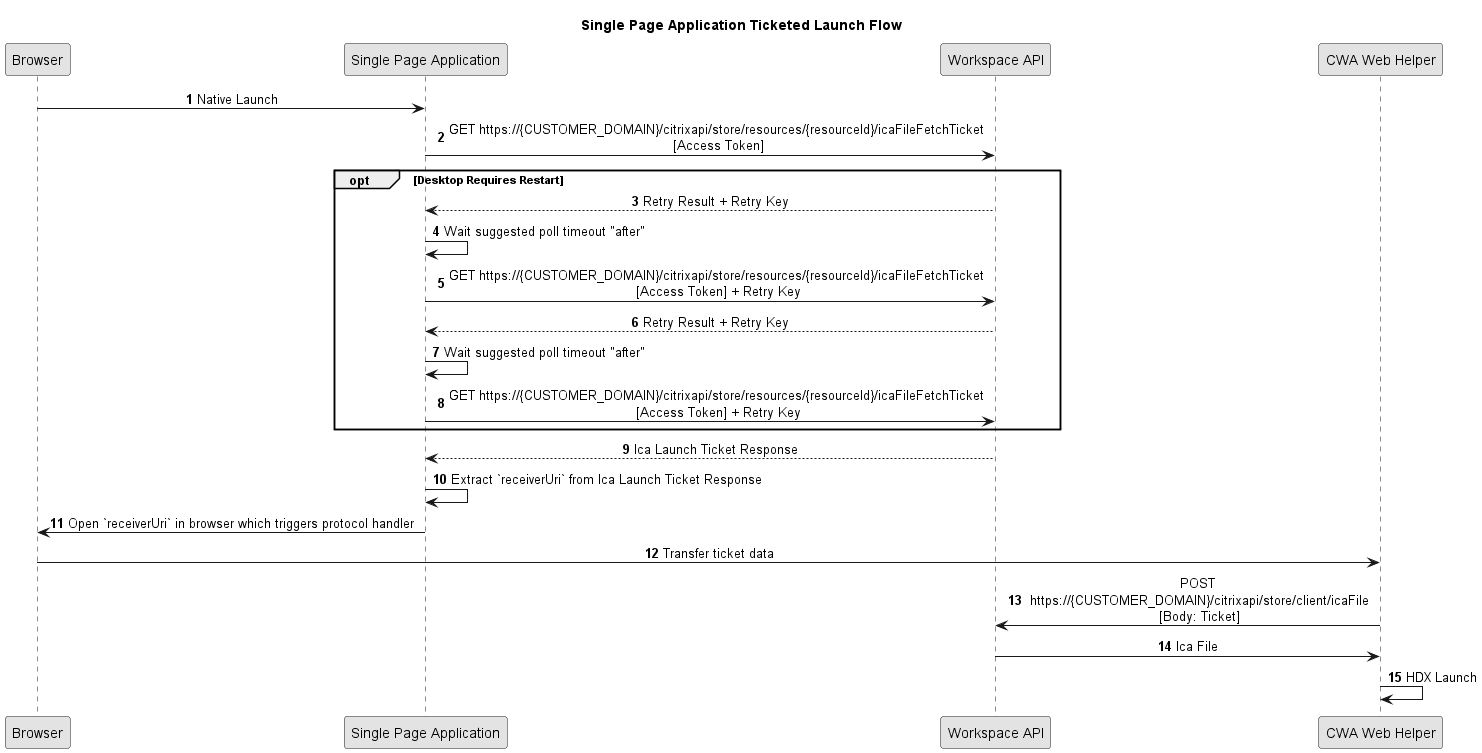
Notes:
Citrix-ApplicationIdhas been omitted from the sequence diagram, see Open API spec for the endpoint requirements.- The sequence diagram illustrates the flow for the
resourceslaunch, which is the same for asessionslaunch.
ICA File Download Launch
Use this flow if you need to retrieve an ICA file. In most case it is recommended that you use the ticketed launch as this allows Citrix Workspace app to directly retrieve the ICA file in memory, avoiding the risks of storing the ICA file on disk. The following steps are how this launch flow is executed:
- Perform an enumeration or session list. For each resource, the response includes a property
icaFileUrlwhich contains the URL to obtain the ICA file. - Call the endpoint discovered in the above step. If it returns retry required (
202) then the resource is not yet ready. The response body contains information about how to proceed. Wait for the period defined inpollTimeoutthen call the endpoint defined inretryUrl. You may need to repeat this multiple times. - Once the endpoint returns the ICA file response (
200) the resource is ready to launch. Save the contents of the ICA file to disk with a.icafile extension and start a new process pointing to that file. This triggers a HDX launch and connects to the resource.
Refer to the Native Client sample to see how this launch flow has been implemented.
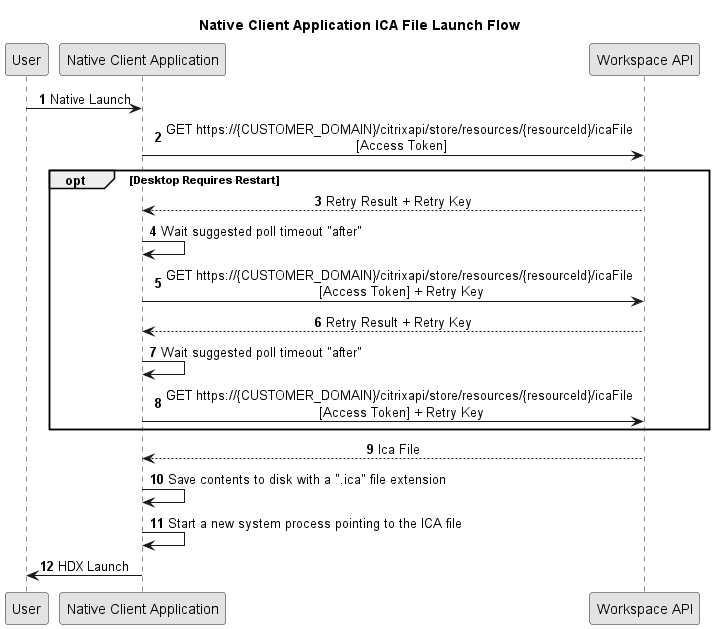
Notes:
Citrix-ApplicationIdhas been omitted from the sequence diagram, see Open API spec for the endpoint requirements.- The sequence diagram illustrates the flow for the
resourceslaunch, which is the same for asessionslaunch.