
Add a static header to the sign in page
Add the following customization code to
script.js. This sets 4 lines of text; delete the lines you don’t want:
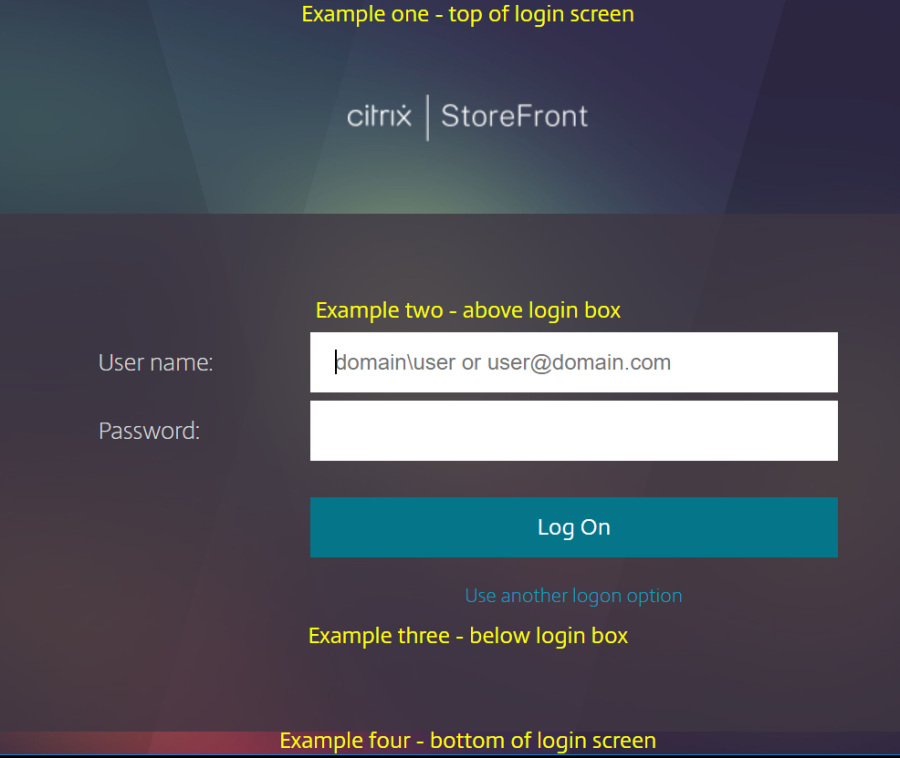
$('.customAuthHeader').html("Example one - top of login screen");
 $('.customAuthTop').html("Example two - above login box");
 $('.customAuthBottom').html("Example three - below login box");
 $('.customAuthFooter').html("Example four - bottom of login screen");
To make them more obvious, add the following styling to
style.css:
.customAuthHeader,
 .customAuthFooter,
 .customAuthTop,
 .customAuthBottom
 {
     font-size: 16px;
     color: yellow;
     text-align: center;
 }
After adding the customization code, here is what it looks like:
If you want to use html, rather than plain text, change as follows:
$('.customAuthHeader').html("<b>Example one</b> – top of login screen");
 $('.customAuthTop').html("<div style='background:black'>Example two – above login box</div>");
 $('.customAuthBottom').html("<i>Example three – below login box</i>");
 $('.customAuthFooter').html("<img src='https://developer-docs.citrix.com/content/dam/placeholder.png'>Example four – bottom of login screen");
(The fourth example needs an image called logo.png in the custom directory).